

Ottium Ottium Download

Rest is part of the work.

Ottium reminds you to look away, stretch and move, right from your Mac's notch. Breaks, reminders and focus, made for people who sit at a laptop all day.

Download for macOS

Alpha 0.1.0 · macOS 15 or later · Apple Silicon and Intel

Small breaks, all day long

Ottium lives in your menu bar and speaks up from the notch, only when it's time.

Alerts from the notch

A gentle nudge, not a notification.

When it's time for a break, a small card grows out of your MacBook's notch. Start a 20 second eye break or a neck roll and a little figure shows you how. Away from your Mac or in a call? Ottium waits, and counts the time away as a break.
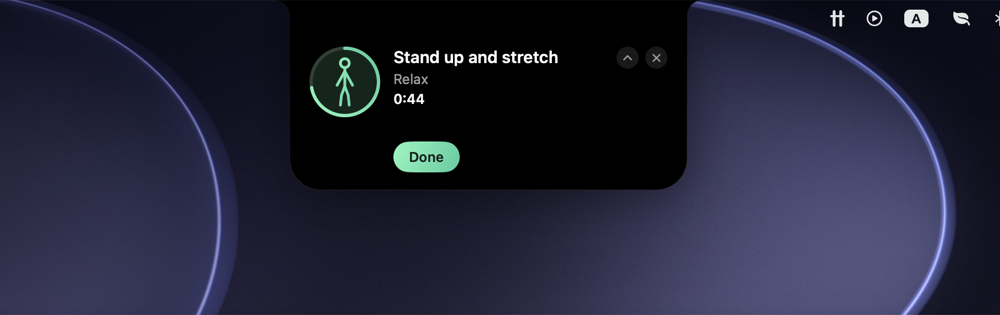
An Ottium alert under the MacBook notch: a timed stand-up stretch with an exercise figure, a countdown ring and a Done button.

Reminders that fit your day

Work and private, on your hours.

Work reminders stay inside your working hours; private ones keep you company in the evening. Start from 28 ready-made reminders for eyes, posture, water and movement, and see your whole day on one timeline.

Ottium's Work screen with a day timeline and reminder cards.

Focus

Work in 25/5, 50/10 or your own rhythm, with the time left in a small pill in the notch. Rain, ocean or a fireplace play while you work, mixed your way.

Ottium's Focus screen with a countdown ring, lengths and sound tiles.

Stats

See how many breaks you actually took, your streak of good days, and which reminders you tend to miss in the afternoon.

Ottium's Stats screen with a done-rate ring, streak, charts and habits.

On-device AI Pro

Say what you need.

Tell Ottium "keep my posture straight and drink more water" and it picks the reminders and how often they come, or describe one and its name, note and timing fill themselves in. It runs on your Mac with Apple Intelligence, so nothing leaves it.

Ottium's Library with the AI planner.

Free to use. Pro, soon.

Everything you need for daily breaks is free. Pro adds more for those who want it.

Free

$0 free forever
  • 3 Work and 3 Private reminders
  • The full library of ready-made reminders
  • Notch alerts and timed micro-breaks
  • Focus with presets and noise sounds
  • Today's done rate, streak and focus time
Download

Frequently asked questions

Why does macOS warn me when I open Ottium?

Ottium isn't notarized by Apple yet; that comes with the full release. Until then, macOS asks you to confirm once:

  1. 1

    Open the downloaded Ottium disk image and drag Ottium to Applications.

  2. 2
    macOS dialog: “Ottium” Not Opened. Apple could not verify “Ottium” is free of malware. Buttons: Done, Move to Bin.

    Open Ottium from Applications. macOS says it can't verify it: click Done.

  3. 3
    System Settings, Privacy & Security: “Ottium” was blocked to protect your Mac, with an Open Anyway button.

    Open System Settings → Privacy & Security, scroll down to Security and click Open Anyway.

  4. 4
    macOS dialog: Open “Ottium”? Buttons: Move to Bin, Open Anyway, Done.

    Click Open Anyway once more and confirm with Touch ID or your password. That's it, once per download.

Is my data private?

Your reminders, notes and stats stay on your Mac. Ottium sends anonymous usage counts (like how many reminders you have and which features you use, never their names or notes) to help decide what to build next. You can turn that off in Settings → General. The details are on the privacy page.

Which Macs does it run on?

Any Mac with macOS 15 Sequoia or later, Apple Silicon or Intel. The alerts grow out of the notch on MacBooks that have one, and from the top of the screen on other displays. The AI features need a Mac with Apple Intelligence turned on.

I have a license key

Click the activation link you got, or paste the key in Ottium under Settings → About → License, and click Activate.

How do updates work?

Ottium checks this site about once a day. When there's a new version, a quiet line appears in its menu and window with a Download button; download it and drag it over the old one in Applications. Your reminders and stats stay.

How do I uninstall it?

Quit Ottium from its menu, then drag it from Applications to the Trash. To remove its data too, delete ~/Library/Containers/dev.vostic.Ottium.

Your download has started

Here's how to open Ottium the first time. Ottium isn't notarized by Apple yet; that comes with the full release.

Didn't start? Download again.

Ottium is a Mac app

Open this page on your Mac to download it. Send yourself the link:

ottium.pitlane.win